 Blog
BlogAnnouncing the Score Labspace: learn Score hands-on, in minutes
 October 26, 2026
 4 min read
 Mathieu Benoit, Score maintainer and CNCF Ambassador
SHARE


🎉 Today we’re announcing the Score Labspace, a brand new hands-on lab to learn about Score and its score-compose and score-k8s implementations and their features by actually running them! 🎉
Why a lab?
Since the beginning, one of the most frequent pieces of feedback we hear from the community is: “I get the idea behind Score, but I’d like to try it before setting everything up.”
We’ve already worked on that front with the Score documentation and, more recently, with the Score Examples Hub. The Score Labspace goes one step further: it’s a guided learning experience where the instructions and a ready-to-use terminal live side by side, with all the tools already installed for you.
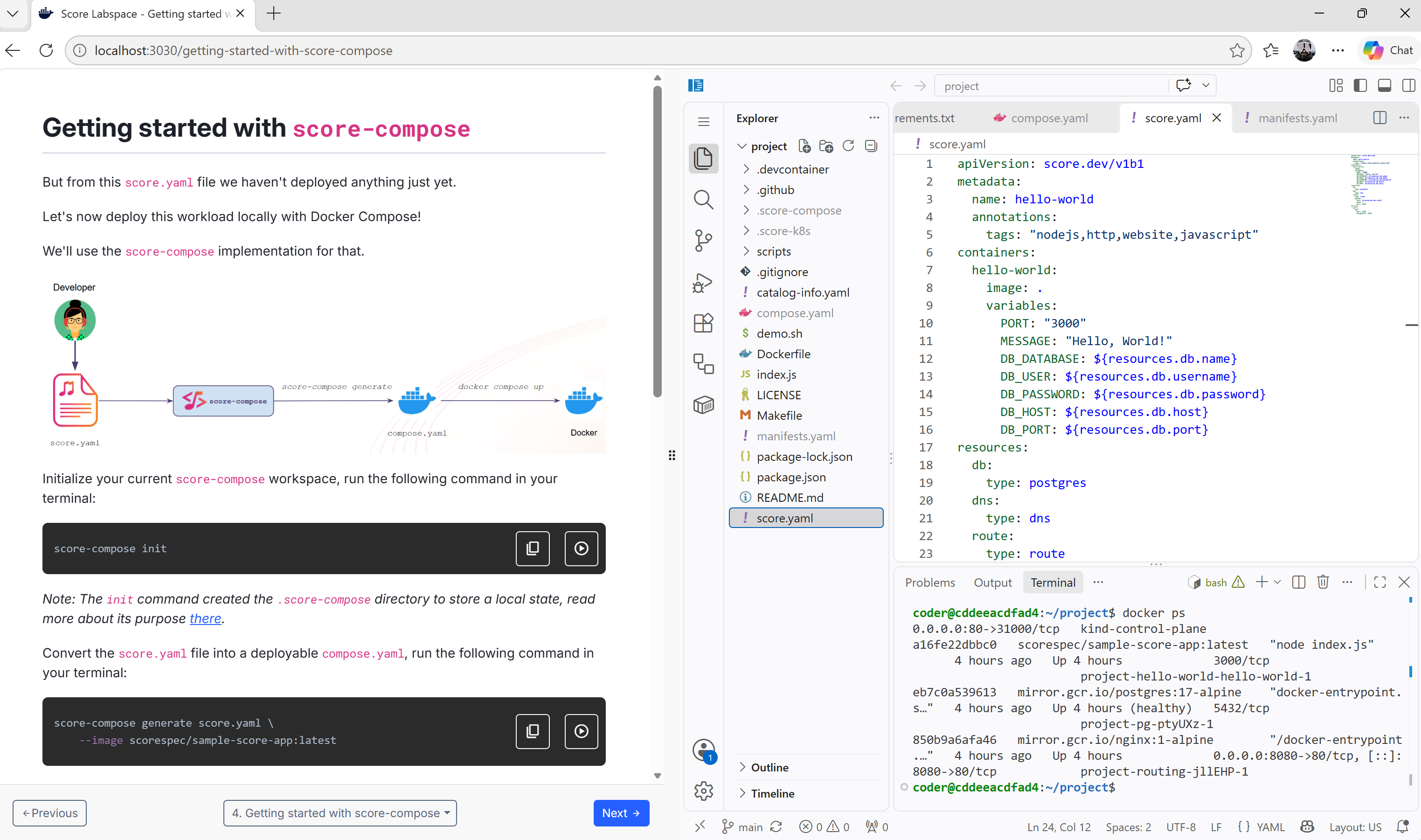
No need to install score-compose, score-k8s, kubectl or kind on your machine. If you have Docker with Compose, you’re ready to go.
Run it in one command
docker compose -f oci://scorespec/score-labspace:latest upThen open http://localhost:3030 and follow the instructions in your browser.
What will you learn?
The lab is split into seven short modules, each building on the previous one:
- Introduction to Score: what Score is, and how it separates Abstraction for Developers from Standardization for Platform Engineers.
- The Score Specification: how to write a
score.yamlfile, from the simplest workload to a realistic one with a PostgreSQL database, DNS and a route. - Getting started with
score-compose: turn that samescore.yamlinto acompose.yamland run it locally with Docker Compose. - Getting started with
score-k8s: take the exact samescore.yaml, generate Kubernetes manifests and deploy them to a localkindcluster. - Advanced scenario with
score-compose: customize the output. - Advanced scenario with
score-k8s: customize the output, Kubernetes edition. - Next steps: where to go from here.
One Score file, two platforms
The heart of the lab is the “aha” moment: you write a single, platform-agnostic Score file…
apiVersion: score.dev/v1b1
metadata:
  name: hello-world
  annotations:
    tags: "nodejs,http,website,javascript"
containers:
  hello-world:
    image: .
    variables:
      PORT: "3000"
      MESSAGE: "Hello, World!"
      DB_DATABASE: ${resources.db.name}
      DB_USER: ${resources.db.username}
      DB_PASSWORD: ${resources.db.password}
      DB_HOST: ${resources.db.host}
      DB_PORT: ${resources.db.port}
resources:
  db:
    type: postgres
  dns:
    type: dns
  route:
    type: route
    params:
      host: ${resources.dns.host}
      path: /
      port: 8080
service:
  ports:
    www:
      port: 8080
      targetPort: 3000
…and then deploy it twice, without changing a single line:
# With Docker Compose
score-compose init
score-compose generate score.yaml --image scorespec/sample-score-app:latest
docker compose up -d

# With Kubernetes
score-k8s init
score-k8s generate score.yaml --image scorespec/sample-score-app:latest
kubectl apply -f manifests.yaml
Going further: patch templates and provisioners
The two advanced modules are where Platform Engineers will feel at home. You’ll learn how to:
- Override properties of the Score file at generation time with
--override-property. - Customize the generated output with patch templates, for example to enforce a secure, unprivileged posture (
read_only, non-rootuser, dropped capabilities for Compose;securityContextand a dedicatedServiceAccountfor Kubernetes). You’ll also see how to load community patchers from the Examples Hub. - Define your own resource types with resource provisioners: start from zero provisioners, watch
generatefail withresource 'dns.default#hello-world.dns' is not supported by any provisioner, then bring your owndnsprovisioner and fix it step by step. - Use platform-specific options like
--build(Compose) or--namespace,--generate-namespaceand--format kyaml(Kubernetes).
By the end, you’ll have a concrete picture of how Developers describe what they need, while Platform Engineers decide how it’s delivered.
Open source and open to contributions
The Score Labspace lives in score-spec/score-labspace. Each module is a simple Markdown file, so improving an explanation or adding a new scenario is a pull request away.
It’s built with Docker Labspaces, and Score is proudly part of the Docker-Sponsored Open Source Program. 🐳
What’s next?
Give the lab a try and tell us what you think! Is a scenario missing? Is a step unclear? Which implementation or resource type would you like to see covered next? Your feedback shapes the next modules.
- Start the lab: github.com/score-spec/score-labspace
- Share feedback or ideas: open an issue
- Join the conversation: Score community
- Keep exploring: Score Examples Hub
Come and see it live at KubeCon NA 🎤
Want a guided tour instead? The Score Maintainers will be demoing the Score Labspace live at our Kiosk in the Project Pavilion at KubeCon + CloudNativeCon North America 2026 in Salt Lake City (November 9-12)!
- 📍 Where: Kiosk P-17B at the Project Pavilion, Hall 5 (Cosmic Canyon), Level 1, Salt Palace Convention Center
- 🕒 When: Thursday 10:15 AM - 2:00 PM
Come say hi, run the lab with us, ask your questions about Score, and tell us what you’d like to see next. You can find the kiosk in the Project Pavilion Kiosk Directory. We can’t wait to meet you there!
Let’s Score it! 🎶
Blog overview